Imports
Bring your positions in. Nothing is guessed.
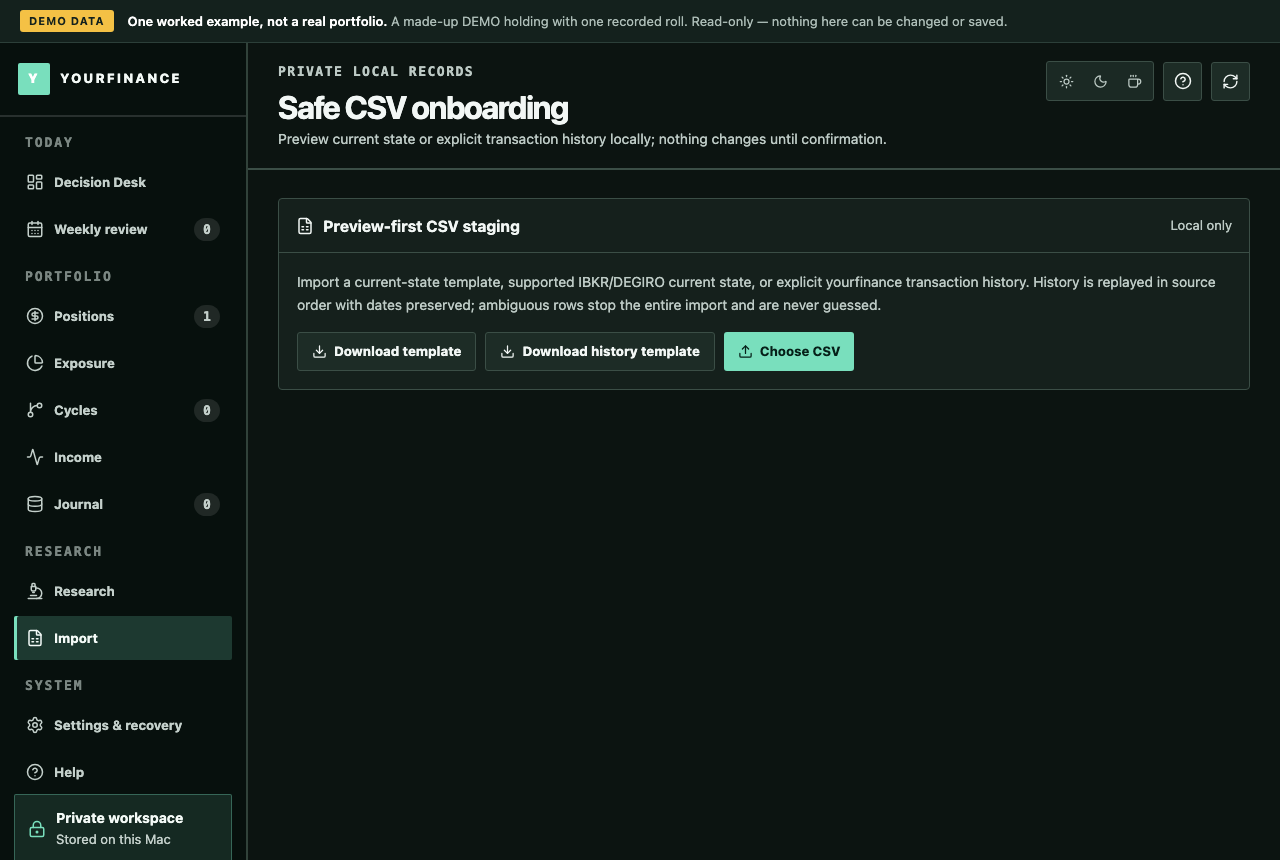
Import your broker's CSV or the yourfinance template. The preview reads the file on your computer, labels every row, and asks you for anything the file cannot say exactly. Nothing is written until you confirm.
Download
- macOS, Apple Silicon (M1 or later) DMG · Developer ID signed and notarized
- macOS, Intel DMG · Developer ID signed and notarized
- Windows 10 or 11, from the Microsoft Store signed by Microsoft · updates through the Store · no broker connectors
- Windows 10 or 11, 64-bit ZIP · with broker connectors · not code-signed; Windows may warn or block it
Which Mac? Apple menu → About This Mac shows the chip.
How it works
What yourfinance keeps track of
A preview before anything is written
Every row is labelled valid, duplicate, invalid or needs input, with the exact reason. The file is read on your computer and no record is written.
It asks instead of guessing
A field the file cannot give exactly, such as the ticker on a DEGIRO or Trade Republic row, is asked for inline. A suggestion is labelled a guess and is never imported until you type the value.
All or nothing
Confirming writes every valid row as one transaction with one audit record. If any step fails, every row rolls back, and importing the same file again returns the first import's audit.
Full history from the history template
Share buys, calls and puts, buy-to-close, expiry, assignment and call-away, with dates, fees and partial quantities, replayed in date order. An earlier event is never slipped into the middle of a position's history.
Connectors use the same preview
Pro's read-only connectors fetch from your broker into this same preview. Nothing is recorded until you confirm, and no order is ever placed.
What each file brings in
Broker files bring in your current positions. Only the yourfinance history template replays past events.
| Source | The file | What it brings in | What the preview may ask you for |
|---|---|---|---|
| yourfinance template | Ten columns, one position per row | Shares, raw basis and fees, and one open call or put | Nothing: every column is explicit |
| yourfinance history template | One row per event | Every recorded event, with dates, fees and option references | An option's type, strike, expiry or multiplier when it is missing |
| IBKR | Activity statement or Flex export | Open positions: shares and short options | A ticker it cannot read, or a missing commission |
| DEGIRO | Transactions export, in English, Dutch or German | Current positions, netted from the transactions | The ticker of every share row: DEGIRO names the product, not the ticker |
| Trading 212 | History export (Invest and ISA) | Current share positions; Trading 212 has no options | A missing ticker, or a whole-share count when the net is fractional |
| Trade Republic | Transactions export | Current share positions | The ticker of every position (the export has none), and a whole-share count for savings plans |
Scalable Capital is not supported. yourfinance ships a broker adapter only once it is tested on a real export, and none could be sourced yet. Until then, the yourfinance template works from any spreadsheet. To help, send a real export with the amounts changed through the feedback form.
Questions
Questions about this
Does importing connect to my broker?
No. A CSV import reads a file you saved. Only Pro's connectors fetch from a broker: read-only, with keys you create, and only when you press refresh.
Will my past premium come in as realized?
No. A broker's current positions come in as they stand: share cost as raw basis, and the credit of an open option as open premium. Nothing is described as past realized P&L; for your history, use the history template.
What happens to a row it cannot read?
It stays out, marked invalid or needs input with the reason, and the valid rows are not blocked. Fill in the value in the preview, or fix the file, and preview again.
Can I import the same file twice?
Yes, safely. An identical import returns the first import's audit instead of creating another position, and an event already recorded is shown as a duplicate and skipped.
My broker is not listed. What now?
Use the yourfinance template: ten columns that any spreadsheet can fill from your broker's positions view. Download it in the app under Import.
Try it on your own records
A 10-day free trial with every feature, then read-only until you buy. No account, no card; your records stay on your computer.
Download
- macOS, Apple Silicon (M1 or later) DMG · Developer ID signed and notarized
- macOS, Intel DMG · Developer ID signed and notarized
- Windows 10 or 11, from the Microsoft Store signed by Microsoft · updates through the Store · no broker connectors
- Windows 10 or 11, 64-bit ZIP · with broker connectors · not code-signed; Windows may warn or block it
Which Mac? Apple menu → About This Mac shows the chip.